
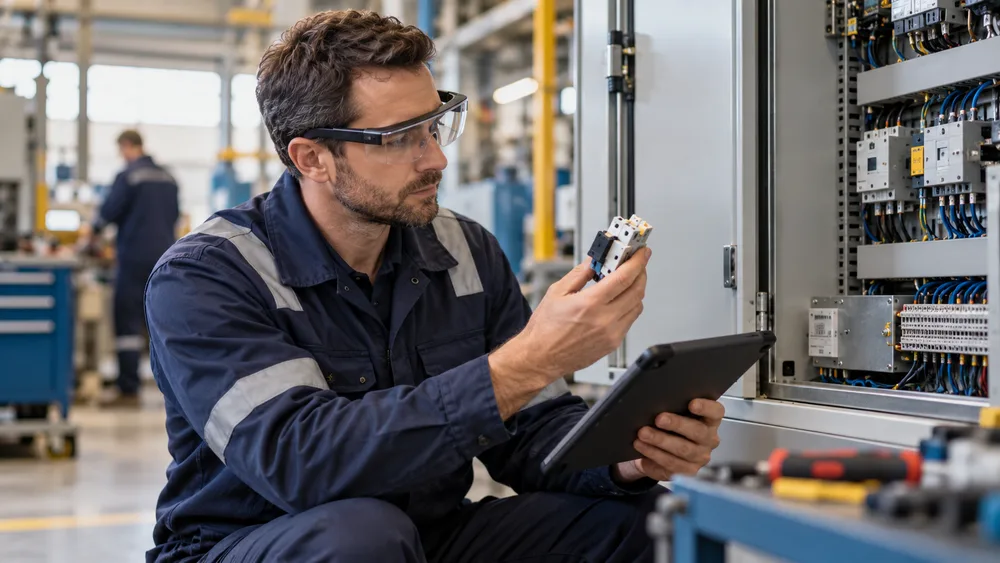
Could your employees learn complex tasks while looking at the real equipment instead of leaving the workplace for another slide deck?
Augmented reality training places digital instructions, 3D objects, warnings, demonstrations, and feedback into a learner’s view of the physical world. For companies that need people to perform accurately around equipment, products, facilities, or customers, that context can turn training from an isolated event into guided practice at the moment of need.
This enterprise guide explains where AR training fits, how it differs from virtual reality, how to build a practical pilot, and which measures demonstrate business value. It complements Mimic Business’s broader work in immersive XR training, interactive 3D simulation, and AI-supported learning.
What augmented reality training is
Where AR training creates business value
High-impact AR training use cases
AR training vs. VR and traditional learning
How to implement and measure AR training
What Is Augmented Reality Training?
Augmented reality training is a learning method that adds digital information to a real environment through a phone, tablet, smart glasses, or another spatial device. The learner still sees the machine, room, product, or colleague in front of them. AR adds the next instruction, an animated overlay, a highlighted component, a safety boundary, or a decision prompt precisely where it is useful.
That distinction matters. A manual asks the employee to translate a diagram into action. A video demonstrates the task on another screen. AR can connect the instruction to the actual object, reducing the mental effort required to switch between reference material and performance. The experience can respond to sequence, location, object recognition, or learner input.
The content may combine 3D models, animation, spatial audio, knowledge checks, and remote expert support. Mimic Business’s capabilities in 3D design, scripting, motion capture, and scanning make it possible to build guidance around a company’s real processes rather than forcing every learner through generic content.
AR is especially useful when employees must keep their awareness of the real workplace. A technician can view a highlighted access panel while standing beside a machine. A warehouse employee can follow a picking sequence while moving through an aisle. A salesperson can explore a product model at full scale without transporting the physical product.
In-context guidance attached to real objects or spaces
Step-by-step procedures that advance as work is completed
Interactive 3D models that reveal hidden components or process states
Safety prompts, inspection checkpoints, and immediate corrective feedback
Optional links to experts, knowledge bases, or performance systems
Where AR Training Creates Business Value
The strongest AR business cases begin with a costly performance problem, not with a device. Look for tasks where employees repeatedly pause to find information, ask an expert, interpret a complex diagram, travel to a training location, or recover from preventable errors. Those moments reveal where contextual guidance can remove friction.
Faster time to competence is often the first benefit. New hires can practice the correct sequence with prompts available at the point of work. Experienced people can refresh an infrequent procedure without attending a full course. The same digital experience can be distributed across locations, helping an enterprise standardize what good performance looks like.
AR can also preserve institutional knowledge. A subject-matter expert’s method can be captured as a visual workflow, including the small checks that rarely appear in formal documentation. Once approved, the experience gives more employees access to that expertise without requiring the expert to repeat the same demonstration at every site.
For onboarding, AR works best as one layer in a structured journey. Pair it with the principles in our guide to immersive onboarding simulations, while supervisors continue to provide coaching, culture, and judgment that technology should not replace.
Consistency is another source of value. Approved digital instructions can align shifts, contractors, languages, and locations while remaining easier to update than printed materials. That does not remove the need for governance. It makes ownership, review cycles, and version control visible requirements of the program.
Reduce time spent searching manuals and procedures

Lower dependence on scarce experts for routine support
Improve consistency across shifts, sites, and contractors
Provide safer preparation before independent task execution
Collect evidence about steps, errors, retries, and support requests
High-Impact Augmented Reality Training Use Cases
Maintenance and service are natural starting points. An AR experience can identify a component, display the correct tool and sequence, warn about isolation requirements, and show what a successful result looks like. The employee’s attention stays on the asset, while the organization gains a consistent procedure that can be updated centrally.
Manufacturing and assembly teams can use spatial work instructions for changeovers, quality inspections, and multi-stage builds. Instead of asking a new operator to memorize every variation, AR can present the correct path for the model in front of them. Checkpoints can require confirmation before the employee advances, helping reduce skipped steps.
Safety programs can highlight exclusion zones, PPE requirements, inspection points, and emergency controls during supervised walkthroughs. For higher-risk scenarios that should not occur around live equipment, combine AR orientation with simulation. See our guides to VR safety training for safer workplaces and measuring VR safety training ROI for a complementary approach.
Product and customer training is another strong area. Sales teams can place a large product in a client’s environment, separate its layers, and practice a guided explanation. Field teams can learn new configurations without waiting for every physical unit. Customer-facing AR can later reuse approved 3D assets, extending the value of the original training investment.
Healthcare, utilities, logistics, retail, construction, and facilities teams can all benefit when work is physical, variable, and information-heavy. The right use case is not the most impressive demonstration. It is the one where accurate, timely guidance changes a measurable behavior.
Equipment maintenance, inspection, and troubleshooting
Manufacturing assembly, changeovers, and quality assurance
Workplace orientation, hazard recognition, and compliance refreshers
Warehouse picking, packing, inventory, and equipment procedures
Product knowledge, sales demonstrations, and customer education
Remote expert coaching for field service and distributed operations
AR Training vs. VR and Traditional Learning
AR, VR, classroom instruction, video, and e-learning solve different parts of the learning problem. AR keeps the real environment visible and adds guidance to it. VR replaces the real environment with a controlled simulation. Traditional formats remain efficient for concepts, discussion, policy, reflection, and information that does not need spatial practice.
Choose AR when learners must interact with a real object or location and need support during performance. Choose VR when the real scenario is dangerous, unavailable, expensive, rare, or emotionally difficult to reproduce. An emergency response or complex branching conversation may be more effective in VR because the complete environment can react to the learner.
For enterprises comparing immersive formats, the virtual reality training program guide provides a parallel framework. A strong portfolio often uses short digital preparation, immersive practice, supervisor feedback, and point-of-work AR support rather than forcing one technology onto every objective.
Device choice follows the work. Tablets and phones are accessible, familiar, and suitable for many pilots. Hands-free glasses can help when employees need both hands, but comfort, field of view, battery life, safety rules, connectivity, and cleaning requirements must be tested in the real environment. A successful mobile pilot does not automatically justify headsets.
Blended learning also creates a clearer transfer path. Employees can learn concepts before work, rehearse difficult decisions in simulation, perform with contextual AR prompts, and receive human coaching afterward. Each format does the job it handles best, while assessment and operational data reveal where additional practice is needed.
Use classroom or e-learning for foundational knowledge and discussion
Use video for demonstration when interaction is unnecessary

Use VR for safe rehearsal in a controlled simulation
Use AR for real-world guidance and performance support
Use blended learning when competence needs knowledge, practice, coaching, and reinforcement
How to Implement and Measure AR Training
Start by defining the target behavior in operational language. “Understand the machine” is vague. “Complete the weekly inspection in the approved order, identify three failure indicators, and record the result without expert assistance” is testable. Clear behavior makes content design, device selection, assessment, and ROI measurement far easier.
Observe the task with the people who perform and supervise it. Capture the environment, decisions, exceptions, safety controls, existing documentation, and moments where novices hesitate. This discovery prevents an attractive experience from encoding an incomplete or unrealistic process. It also reveals whether AR is genuinely the right intervention.
Build the smallest pilot that can prove value. Select one task, one learner group, and one environment. Use existing phones or tablets if they can answer the central question. Create only the 3D assets and interactions necessary for the target behavior. Test with experienced employees and novices because each group reveals different failures. For a manufacturing-specific example, see our XR training pilot brief, deliverables and review gates.
Mimic Business follows a consult, plan, design, and deploy approach for custom simulations. Explore our corporate learning services and learn more about the team before planning a focused pilot.
Integration should be proportional to the pilot. An LMS connection can record completion and assessment. Identity and role data can assign the right procedure. Analytics can reveal repeated errors. A small pilot does not need every enterprise integration on day one. Prove performance improvement, then add the systems required for scale.
Measure Outcomes, Not Activity
Measure the outcome that justified the project. For slow onboarding, track time to independent performance, supervisor hours, and early error rates. For maintenance quality, track first-time completion, rework, downtime, and expert escalations. Completion rate alone shows activity, not business impact.
Establish a baseline before the pilot and compare similar groups where practical. Record current time, error rate, support burden, travel, consumables, and equipment availability. During the pilot, capture the same measures plus usability evidence such as abandoned steps, repeated instructions, tracking failures, or device discomfort.
A useful ROI view includes avoided cost, productivity recovered, quality improvement, and risk reduction, then subtracts production, hardware, integration, support, and update costs. Treat assumptions transparently. Safety and knowledge-retention benefits may be strategically important even when they are harder to convert into one currency figure.
AI can add natural-language coaching, adaptive prompts, and knowledge retrieval to spatial guidance. See how conversational AI supports employee training and explore our conversational AI capabilities for dialogue-based scenarios.
Finally, measure adoption after novelty fades. Track repeat use, voluntary use, manager support, device availability, content freshness, and the reasons people return to older methods. Sustainable ROI depends on operational ownership, accessible devices, accurate content, and a credible update cycle—not a one-time launch.
Define a measurable behavior and baseline current performance
Select a frequent, costly, error-prone, or expert-dependent task
Map the workflow with operators, trainers, safety, and compliance
Prototype on the least complex suitable device
Test usability, physical safety, accessibility, and accuracy
Compare time, errors, support, quality, adoption, and total cost
Revise the experience and create governance before scaling
Conclusion
Augmented reality training earns its place when contextual guidance improves a real behavior: faster onboarding, fewer errors, safer preparation, better knowledge transfer, or less dependence on scarce experts. Start with the performance problem, prove value on a focused task, and choose devices and integrations only after the learning and operational needs are clear.
Ready to test a practical AR training use case? Contact Mimic Business to plan a focused pilot that combines spatial design, interactive 3D content, and measurable enterprise learning outcomes.
Frequently asked questions
What is augmented reality training?
It overlays digital instructions, 3D visuals, warnings, or feedback onto a learner’s view of a real environment, usually through a phone, tablet, or smart glasses.
How does AR training differ from VR training?
AR keeps the physical workplace visible and adds digital guidance. VR replaces it with a complete simulation. AR supports point-of-work performance; VR supports controlled rehearsal.
Which industries benefit most from AR training?
Manufacturing, field service, logistics, utilities, construction, healthcare, retail, and facilities often benefit because employees perform physical, variable, information-heavy tasks.
Do employees need smart glasses?
No. Phones and tablets are often the most practical pilot devices. Smart glasses become valuable when hands-free work is essential and the environment supports safe, comfortable use.
How much does an AR training program cost?
Cost depends on procedure complexity, 3D assets, devices, integrations, languages, analytics, and governance. A focused pilot establishes realistic cost and benefit assumptions.
Can AR training connect to an LMS?
Yes. It can pass completion, assessment, time, and performance data when the selected systems and integration approach support it.
Is AR training safe around machinery?
It can be, but the experience and device must be risk-assessed. Content must not obscure hazards, divide attention, or interfere with PPE.
How long does an AR training pilot take?
Timing varies with task complexity, expert access, assets, devices, and approvals. A tightly scoped pilot is faster and provides evidence for a larger roadmap.
What should an AR pilot measure?
Measure the operational problem: time to competence, errors, assistance, rework, downtime, quality, safety behavior, usability, and sustained adoption.
Can AI be combined with AR training?
Yes. AI can support coaching, adaptive prompts, retrieval, translation, and feedback with approved content, privacy controls, escalation paths, and human oversight.
Discussion
Join the conversation
Comments are reviewed before publication to keep the discussion useful.